Skip to content

LEAD

  • Products

    Products

    LEAD.bot for Slack & Microsoft Teams

    Sunrize App for Slack

    Use Cases

    Knowledge Transferring

    • Inclusive Peer Learning & Mentorship
    • Optimize Workforce Collaboration
    • New Hire Onboarding

    Employee Engagement

    • Pulse Survey
    • Birthday and Anniversary Celebration
    • Viture Watercooler

    Knowledge Management

    • Knowledge Network Insights
    • Subject Matter Expert Finder

    Solutions

    Streamline your network analysis with our tailored approach. Our experts will work with you to identify the optimal solution that best fits your needs.

    Contact Sales
  • Customer Stories
  • Integrations
  • Pricing
    • LEAD.bot for Teams Pricing
    • LEAD.bot for Slack Pricing
  • Resources
    • Blog
    • Customer Stories
    • Alternatives
  • FAQ
    • FAQ: LEAD.bot for Microsoft Teams
    • FAQ: LEAD.bot for Slack
  • Try LEAD.bot for Free
    Start With Slack
    Start with Teams
Mar162023
Feature UpdatesMicrosoft TeamsLEAD.bot Calendar Integration Guide for Teams

If you’re constantly searching for ways to improve workplace efficiency and team collaboration, our virtual coffee app, LEAD.bot, now has an innovative feature you won’t want to miss. LEAD.bot, specifically designed for Microsoft Teams, brings a whole new level of convenience with its recently introduced calendar integration. This feature takes the hassle out of scheduling and promises to enhance your experience with our employee matching programs.

With our intuitive interface, LEAD.bot’s calendar integration feature is specifically designed to transform the way you interact within your Microsoft Teams environment. It’s more than just a virtual coffee app; it’s a tool that redefines efficiency and productivity in the digital workspace.

With this feature, employees can easily select from times of mutual availability and directly book meetings through an additional card that accompanies meeting invites. This streamlines the scheduling process and encourages greater participation in matching programs, while providing valuable data insights that help companies tailor their programs to better meet employee needs.

Embracing digital transformation has never been easier with tools like LEAD.bot. Our calendar integration feature not only streamlines the process of scheduling and meeting but also fosters a more connected, engaging workplace. Experience the improved productivity that comes with effectively managed virtual coffee meetings on MS Teams. Don’t miss out; enable calendar integration today!

As the admin for LEAD.bot, what should I do to enable calendar integration?

Enable calendar integration in seconds, steps below: 

Step 1. Sign into the Dashboard by typing “Dashboard” in a direct message with LEAD.bot.
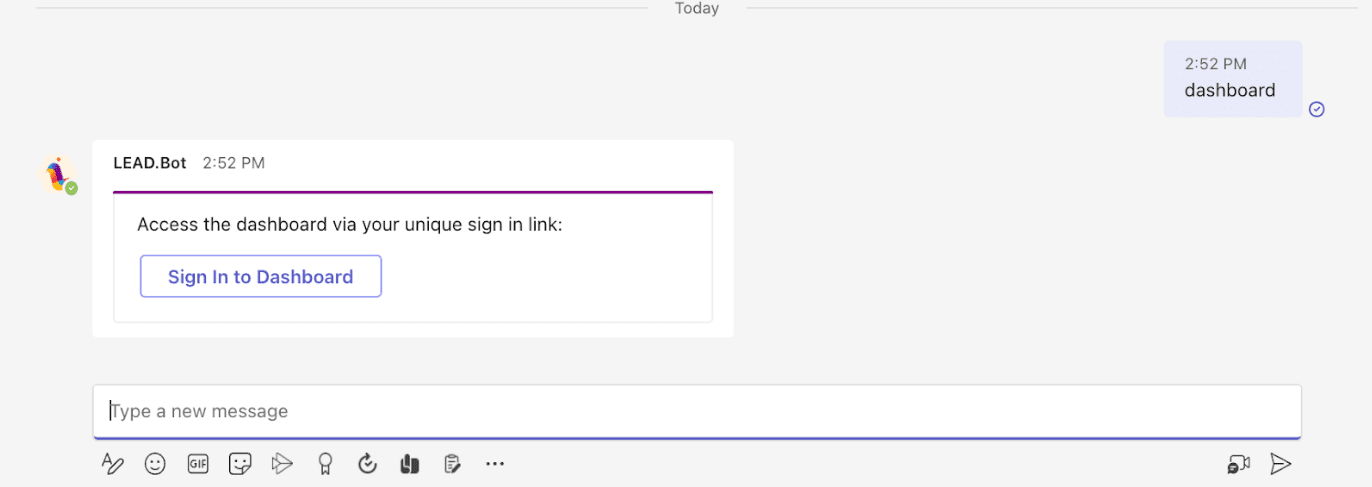
Sign into the LEAD.bot Dashboard

 Step 2. Visit the “Org Settings” tab in the sidebar.
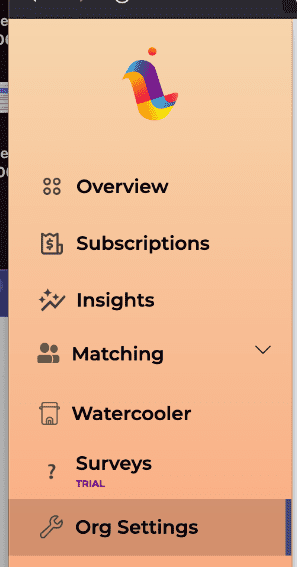
LEAD.bot Org Settings

Step 3. Under the “Organization Matching Settings” section you will find a title named “Enable Calendar Integration”.

Enable LEAD.bot Calendar Integration

Step 4. Click the “Enable Calendar Integration” button in order to grant LEAD.bot permissions to create calendar meetings.

Step 5. Step 4 will open a new tab which will take you to the Microsoft website, where this process will be completed. Click “Accept” in order to grant the appropriate permissions.
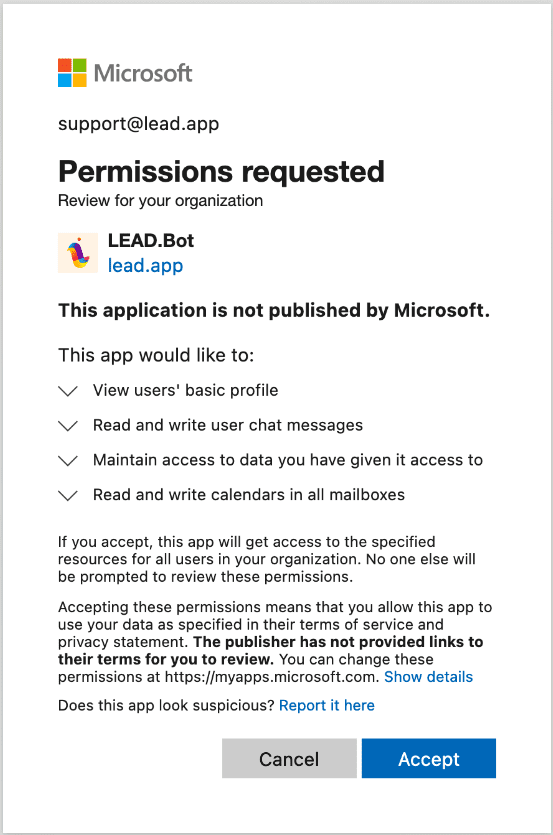
Accept Microsoft Permission Request for LEAD.bot

Step 6. Within one minute the “Enable Calendar Integration” card should change to display “Your organization has Calendar integration enabled”.
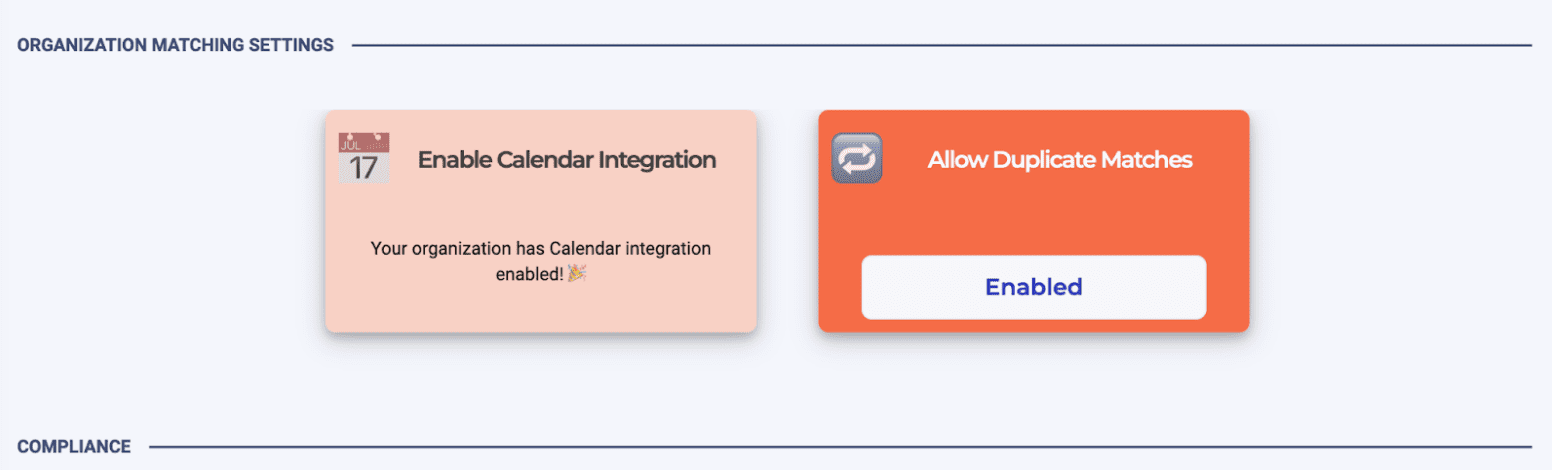
LEAD.bot Calendar integration enabled

Step 7. Calendar integration has now been successfully set up! As a result, when users receive meeting invites, they will now have the option to select from times of mutual availability and directly book meetings through an additional card, making scheduling more efficient than ever.  
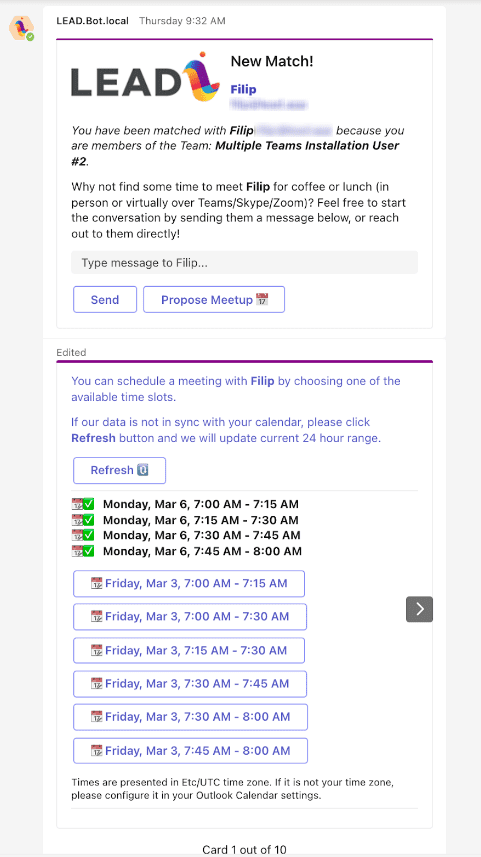
LEAD.bot successfully calendar integration set up

Once your admin enables calendar integration, all employees who participate in LEAD.bot matching will be automatically enrolled for the integration. This means they won’t need to enable it themselves, avoiding confusion and inconvenience. Enjoy the added convenience of this new feature!


Categories: Feature Updates, Microsoft TeamsBy LEAD Editorial TeamMarch 16, 2023
Tags: company culture appcross-team matchingemployee engagementvirtual coffee breaksvirtual team building

Author: LEAD Editorial Team

Post navigation

PreviousPrevious post:LEAD.bot Vs. CoffeePals Vendor Comparison: Features, Pricing, User Experience and TrustworthyNextNext post:Why Should You Transform HR to People Ops to Drive Business Success?

Related Posts

Effective-Employee-Check-ins_-Best-Practices
Effective Employee Check-ins: Best Practices
December 10, 2024
The Remote Work Challenge: Unlocking True Productivity
December 2, 2024
Meta Workplace Alternatives - Slack and Microsoft Teams
5 Reasons to Migrate to Slack MS Teams Before Meta Workplace Shuts Down
May 22, 2024
Admin FAQs for LEAD.bot
Admin FAQs
March 5, 2024
LEAD.bot Use Cases
LEAD.bot Use Cases
March 5, 2024
Program Announcement Templates for LEAD.bot
Program announcement templates
March 5, 2024

LEAD

hi@lead.app

Facebook-f X-twitter

LEAD.bot

  • Optimize Workforce Collaboration
  • New Hire Onboarding
  • ONA-powered Engagement Survey & Insights
  • Inclusive Peer Learning & Mentorship
  • Birthday & Anniversary Celebration
  • Inclusive Peer Learning & Mentorship
  • Optimize Workforce Collaboration
  • New Hire Onboarding
  • Pulse survey
  • Birthday and Anniversary Celebration
  • Virtual watercooler
  • Knowledge Network Insight
  • Subject Matter Expert Finder

Governance & Compliance

  • Terms of Service
  • Privacy Policy
  • Trust at LEAD
  • Terms of service
  • Privacy Policy
  • Trust at LEAD

FAQ

  • LEAD.bot for Microsoft Teams
  • LEAD.bot for Slack
  • LEAD.bot for Microsoft Teams
  • LEAD.bot for Slack

@2025 Lead, Inc.

SCHEDULE A DEMO


Request A Demo

Request Demo

To learn more or request a demo, feel free to contact us.

[contact-form-7 id=”10″]

The video will automatically play once you fill out this form.

video

[contact-form-7 id=”1364″]