

Welcome to the LEAD.bot Watercooler feature guide, where we’ll walk you through the steps to create a vibrant virtual space for your team to engage in informal conversations, akin to gathering around the office watercooler. This feature not only fosters team communication but also promotes micro-learning, leading to enhanced collaboration and productivity across the board.
Purpose of Watercooler Chat
The Watercooler Chat feature is designed to replicate the spontaneous and informal interactions that occur around the physical watercooler in an office environment. By encouraging casual conversations, sharing industry or company knowledge, and facilitating micro-learning on various topics, Watercooler Chats play a crucial role in building a cohesive team dynamic that is both knowledgeable and collaborative.
How it Works
Setting up your Watercooler Chat is a straightforward process that involves a few simple steps:
1. Select the Channel:
Begin by choosing the Slack or Microsoft Teams channel or team where you want the Watercooler topics to be discussed.
2. Configure Schedule & Topics:
Click on the “Configure Schedule & Topics” option. This allows you to set up when and what conversations starters LEAD.bot will post in the selected channel.

3. Schedule and Topics:
Here, you can select a schedule for your Watercooler chats. Decide how often you want these chats to occur—daily, weekly, or at any custom frequency that suits your team’s rhythm.
Choose a pre-packaged “Topic Category” to easily start with topics curated by experts. These categories are designed to cover a wide range of interests and industries.
Alternatively, you can select “Create Your Own ⚡” to tailor conversation starters specifically to your team’s watercooler schedule setting interests, goals, or current events relevant to your industry.
4. Customize Prefix Messages:
Customize the introduction or prefix messages that accompany each topic. This personalization makes the conversation starters more relatable to your team’s goals and interests, enhancing engagement.
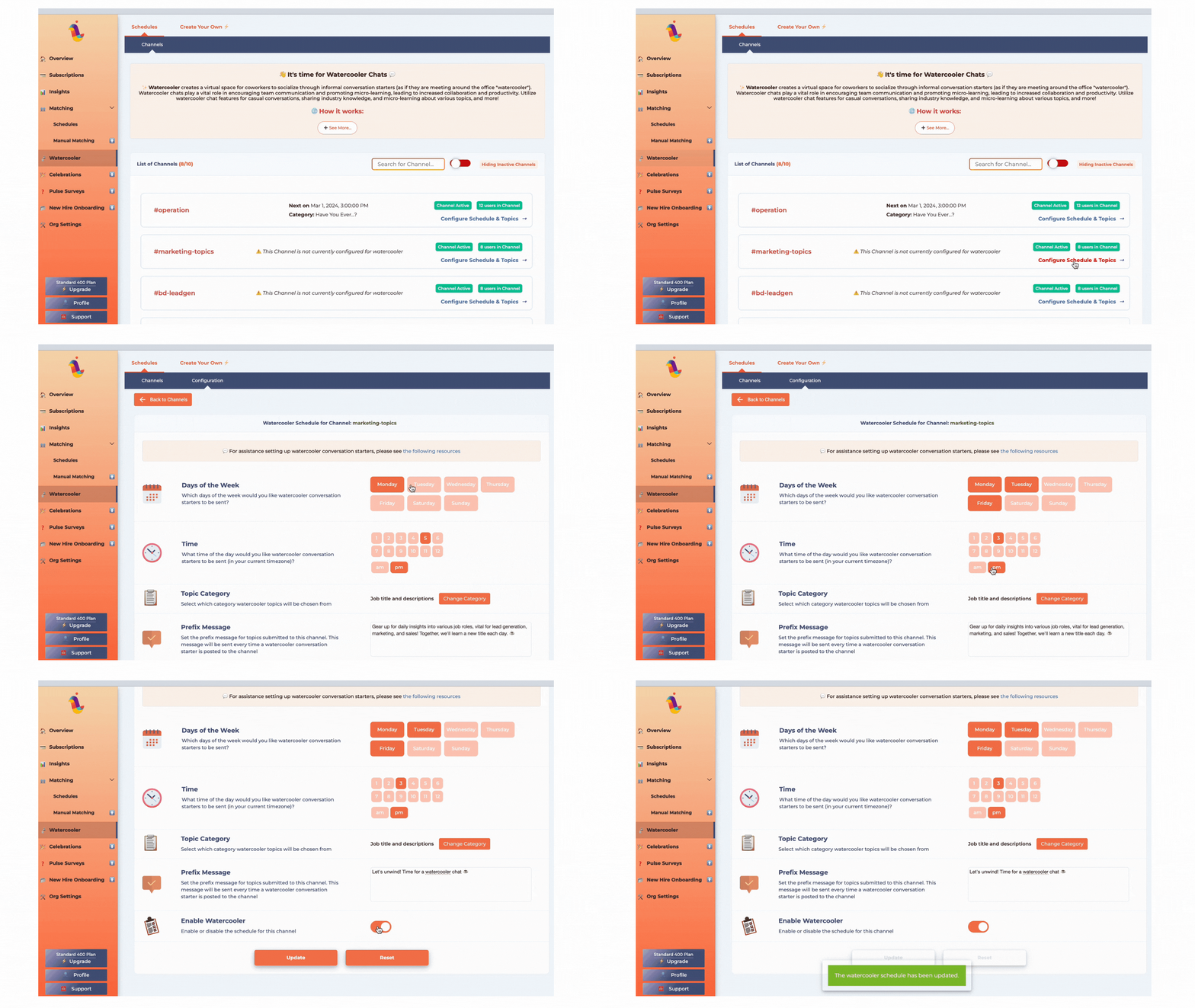
5. Let LEAD.bot Take Over:
Once configured, LEAD.bot will automatically post the conversation starter in the selected channel or team according to your schedule. Just set it up and let the conversations flow 💬!
→ Make sure to check in on the Watercooler chat once in a while. LEAD.bot will do its job and post topic prompts on its own, but it will run out of topic prompts if admins don’t switch to new categories or add more topics. Think about how many topics you have and how often you want the topic prompts to be sent out. For example, if you have 12 topics and you want a new topic to be discussed three times a week, you’ll need to switch to new category or refresh the topic prompts every month. This keeps the chat fun and interesting for everyone.
6. Engage and Enjoy:
With everything in place, all that’s left is for you and your team to engage in the conversations. Share insights, learn from each other, and enjoy the enhanced team dynamic that Watercooler Chats bring.

Benefits of Using Watercooler Chat
♥ Encourages Open Communication: Creates an open environment for team members to share thoughts, ideas, and personal experiences.
♥ Promotes Micro-Learning: Facilitates learning in small, manageable chunks, making it easier for team members to absorb and retain information. Eg., Our customers utilize the watercooler channel to inform their sales teams about the various job titles & responsibilities within their customer profiles, improving their lead generation strategies.
♥ Increases Collaboration: By breaking down silos, Watercooler Chats encourage cross-departmental collaboration and knowledge sharing. Eg., Our customers leverage water cooler channels to educate team members about different business units’ roles, enhancing cross-departmental understanding.
♥ Boosts Productivity: A well-connected team with a strong sense of community is more motivated and productive.
Getting Started
Ready to get started with LEAD.bot Watercooler? Follow the steps outlined above to create your first Watercooler Chat and watch as your team’s communication, knowledge, and productivity soar. If you have any questions or need further assistance, don’t hesitate to reach out to our support team. Let’s make work a place of learning, growth, and connection!